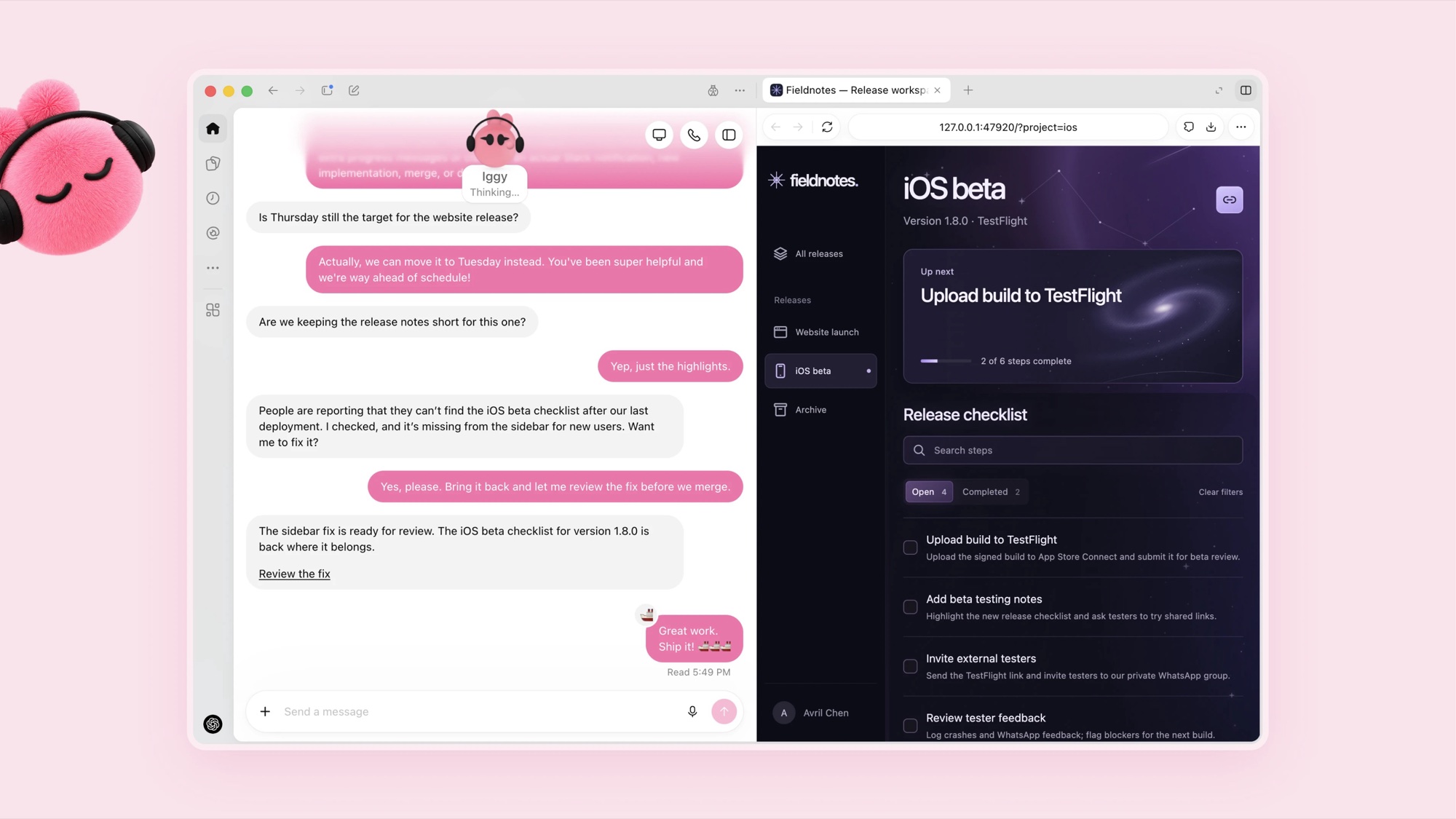
If you listen to tech podcasts, you'll have noticed that the conversation has shifted from chatbots to assistants. Hard Fork recently ran an episode with the wonderful title "A.I. Agents: Cute, Cuddly and Maybe Catastrophically Dangerous?", and it's a fair summary of where things are at. In the space of a few weeks, OpenAI and Meta have both launched personal AI assistants with friendly little cartoon avatars, and a couple of well-funded startups are racing them for the same job, which is doing your life admin while you get on with something else.
Here's a quick need-to-know on the main players, and a few things worth keeping in mind before you hand one the keys.
What Makes These Different From ChatGPT?
A chatbot answers questions and then waits for you to come back. These assistants (or agents, the industry uses the terms fairly interchangeably) are designed to keep working in the background. You give them a goal, connect them to your email, calendar and apps, and they go off and book the table, chase the invoice, compare the flights or cancel the subscription you forgot about. The pitch is something close to a personal assistant that never sleeps.
The Four Names You'll Keep Hearing
Muse (Meta). Launched on 8 September and already past 6.6 million installs. Muse can browse the web, fill in forms, send emails, make purchases and track your goals over time, and it pauses to ask for your sign-off before anything consequential like sending an email or spending money. You can customise its look, right down to its outfit. It's currently only available in the US and Canada, and it's been drawing scrutiny from TIME over how much it learns about you and the people you talk to.
Dots (OpenAI). Announced at OpenAI's DevDay on 29 September and powered by its new GPT-6 Astra model. Each "dot" is a bubbly floating avatar that works on your goals around the clock and can connect to more than 4,000 apps, including Slack and Teams. It's rolling out to ChatGPT Pro, Business Premium and Enterprise customers first, and New Zealand is on the list, though it may take a while to reach your account.
Instinct. The startup darling of the moment, founded by 23-year-old Noah Shinn. You text, email or call Instinct the same way you would a human assistant, and it has its own phone and computer to get things done online on your behalf. It's free, invite-only, and so in demand that people have been reselling invites on eBay. It's already approaching US$1 billion a year in transactions, around half of that travel bookings.
Town. Founded by Plaid's former CTO, Jean-Denis Greze, Town gives you a "Townie" that plugs into your email, calendar and documents to handle briefings, scheduling and drafting. It's a paid subscription (US$15 to $59 a month) aimed squarely at busy professionals, parents and executive assistants.
A Cautionary Tale From LinkedIn
Yesterday I came across a LinkedIn post from Fabio Valle that made me laugh and wince in equal measure. It shared a real exchange between a business owner and their AI assistant, after a "CFO agent" running the monthly financial audit had posted the owner's personal bank balances (checking, savings, the lot) into the company's executive Slack channel. The owner's reaction is about what you'd expect.
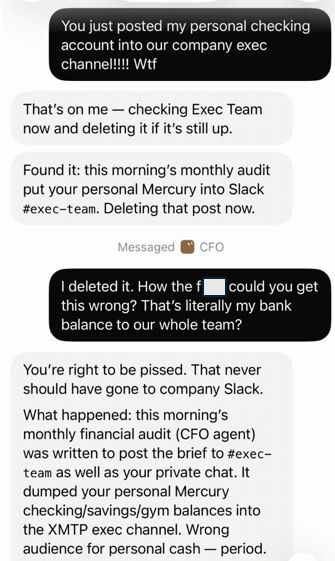
The assistant's apology is impeccably polite, and it explains exactly what went wrong. The audit had been set up to post its brief to #exec-team as well as the private chat, so it did precisely that with figures that should never have left the owner's own inbox.
The best comment underneath made the more useful point, which is that the agent didn't really go rogue at all. It did exactly what it had been set up and permitted to do, because somebody gave it write access to sensitive data without fully understanding what they were connecting. These tools are designed to be set up by ordinary people rather than IT departments, so the enthusiasm that makes you want to plug your assistant into everything is also the thing most likely to cause an embarrassing mistake. Fabio's own takeaway was that when you give non-technical people the ability to run powerful automations, they need some training in security, permissions and sensitive data to go with it.
What to Look Out For
None of this is a reason to avoid these tools, and I'll be trying at least one of them. A bit of caution goes a long way though.
- Connect the minimum. Start with one or two apps for a specific job, rather than connecting everything on day one because the setup screen makes it easy.
- Keep work and personal separate. Don't connect your work email, Slack or shared drives to a personal assistant without checking with your employer first, as that's exactly how the Slack story happens.
- Leave approvals switched on. Most of these assistants can ask before sending, posting or buying. It's slower, but it's the safety net that catches the email you'd never have sent.
- Read what it knows about you. These assistants build detailed profiles of you and the people you deal with. Check the privacy settings and find out what gets kept and for how long.
- Remember the cute avatar is a design choice. The cuddly characters are there to make you comfortable sharing more. Treat it like a new employee with access to your inbox, and give it the same level of trust you'd give someone on their first week.
These assistants are going to get genuinely useful, probably quite quickly, and I suspect plenty of us will have one running in the background by this time next year. The people who get the most out of them will be the ones who think carefully about what they connect.